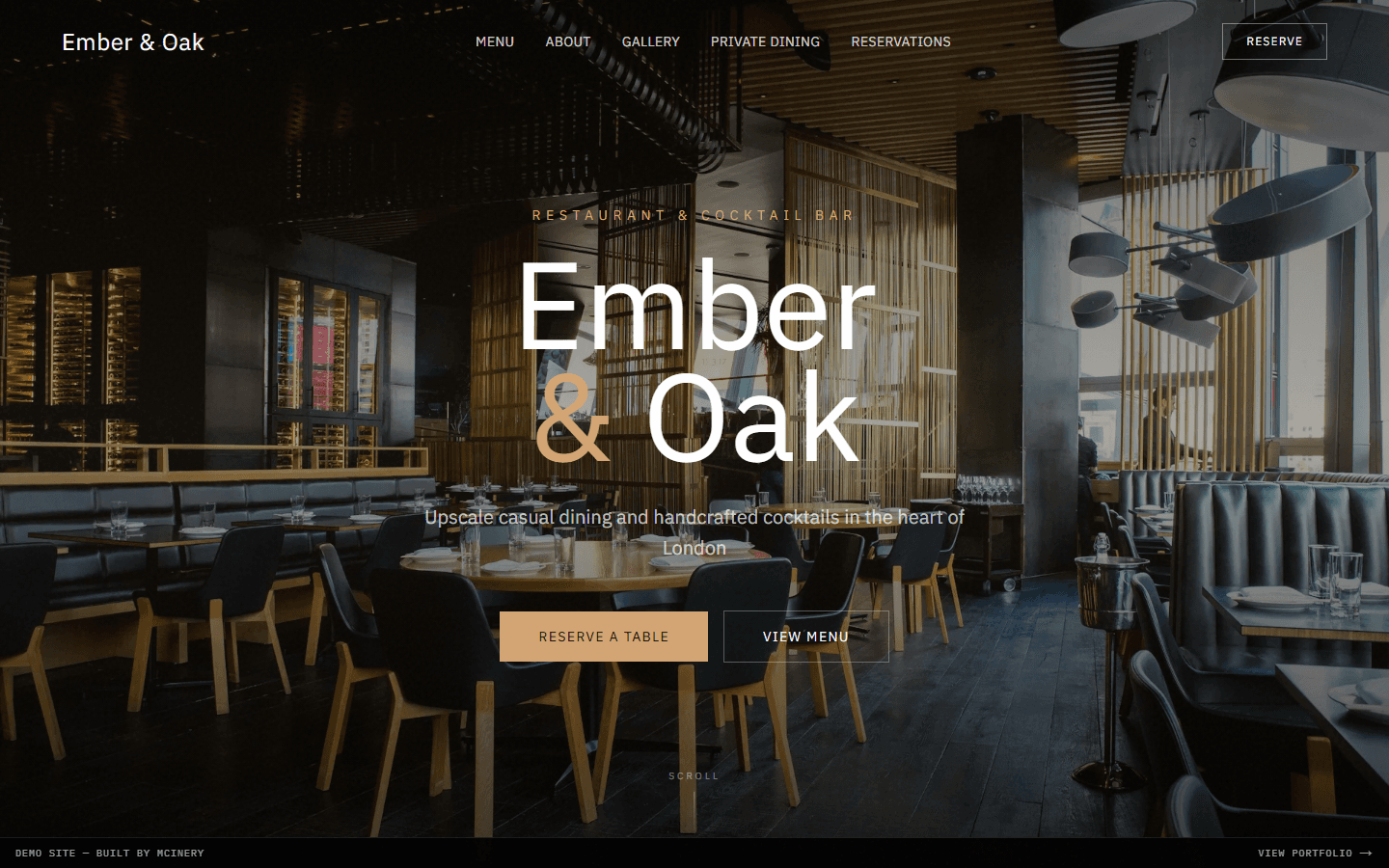
Ember & Oak is an upscale casual restaurant and cocktail bar in Shoreditch. They needed a website that captured the warmth and sophistication of their dining experience — their previous site was outdated, didn't work on mobile, and buried the menu behind a PDF download. The goal was simple: make it easy for people to see what's on offer and book a table. Beyond that, the site needed to serve as a genuine extension of the brand — something that felt like walking through the front door, not just reading about it.
Understanding the Brand
Before writing a line of code, I spent time in the restaurant. The interior tells a story — warm wood tones, soft amber lighting, exposed brick, and the glow of an open kitchen. The website needed to translate that feeling into a digital experience. I sat through a dinner service and paid attention to the things you don't notice in photos: the way the candlelight catches the glassware, the texture of the linen, the deliberate contrast between the rough brickwork and the polished bar top.
The colour palette was drawn directly from the space: deep browns, warm golds, and a cream background that feels like linen. For typography, I chose Playfair Display for headings — a serif that carries the elegance the brand demands — paired with Source Sans for readable body text. The font pairing matters more than people realise. Playfair's high contrast and refined letterforms set the tone immediately, while Source Sans keeps body copy comfortable at smaller sizes without competing for attention.
I also introduced subtle texture throughout the design — a faint paper grain on the background, slightly rounded corners on cards that echo the restaurant's tableware, and generous whitespace that gives the content room to breathe. The overall effect is a site that feels curated rather than templated.

The Menu Problem
The old site had the menu as a downloadable PDF. On mobile, this meant pinching and zooming through a document that was designed for print. Over 70% of restaurant searches happen on mobile — that PDF was costing them covers. I've seen this pattern across dozens of hospitality sites, and it's always the same story: a designer creates a beautiful print menu, someone uploads it to the website, and nobody thinks about the person trying to read it on a bus.
The new menu is fully responsive HTML. Organised by course, with clear pricing, dietary indicators (V, VG, GF, DF), and a 'Chef's Pick' badge on recommended dishes. It loads instantly and looks beautiful on any screen size. I used CSS grid with `auto-fill` and `minmax()` to create a layout that adapts naturally — two columns on desktop, single column on mobile, with no awkward breakpoint jumps. Each dish card has just enough padding to feel spacious without wasting screen real estate.
Seasonal items are flagged with a subtle leaf icon and can be toggled on or off from a simple admin interface. The restaurant changes their specials weekly, so I built the menu content into a structured JSON file that's trivial to update — no code changes needed, just edit the data and redeploy. This was a deliberate choice over a full CMS, keeping the site fast and the workflow simple.
The Cocktail Menu
Ember & Oak takes their cocktail programme seriously — it's not an afterthought, it's half the reason people visit. The cocktail menu deserved its own dedicated treatment rather than being tacked onto the end of the food menu. I gave it a separate tab with a darker colour scheme that shifts the mood, mirroring the transition from the dining room to the bar area in the actual venue.
Each cocktail is presented with its name, a short flavour description, the base spirit, and the price. I added a small colour dot next to each drink that indicates the flavour profile — amber for spirit-forward, green for fresh and citrus-led, pink for fruity. It's a subtle visual cue borrowed from wine tasting cards that helps guests navigate the list without reading every description. The owner told me this detail alone gets comments from customers regularly.
On mobile, the cocktail list collapses into an accordion grouped by spirit category. This keeps the page scannable — nobody wants to scroll through forty cocktails in a single list. A sticky category nav at the top lets you jump between sections with a tap.
Driving Reservations
The entire site is designed around one goal: getting people to book a table. The reservation form is accessible from every page via the navigation bar and a floating 'Reserve' button that appears on scroll. I used `position: sticky` with a slight `backdrop-filter: blur()` so the button feels integrated rather than intrusive — it's always there, but it never covers content you're trying to read.
I deliberately avoided third-party booking widgets. They break the visual experience, add load time, and often redirect users to a different site. Instead, the form is native — date, time, party size, and special requests. It feels like part of the restaurant, not a bolted-on tool. The form validates in real time using lightweight client-side checks: no past dates, party size between 1 and 12, and a character limit on special requests to keep submissions manageable.
I also added a confirmation step that shows the booking summary before submission, reducing errors and no-shows. After submitting, the user sees a branded confirmation screen with the restaurant's address, a link to Google Maps, and a note about their cancellation policy. Every touchpoint reinforces the brand rather than dropping the user into a generic 'Thank you' page.
Gallery & Photography
Restaurant photography can make or break a site. I worked with the owner to curate a gallery of around thirty images — the space, the food, the bar, and candid shots of the team at work. The gallery uses a CSS grid masonry layout with `column-count` and careful `break-inside: avoid` rules to create that Pinterest-style staggered grid without any JavaScript library overhead.
Each image opens in a lightbox with swipe navigation on mobile and keyboard controls on desktop. I implemented this with a minimal custom component rather than pulling in a library — it's just a portal, a `useEffect` for keyboard events, and CSS transitions. The total JavaScript for the lightbox is under 2KB gzipped. Images in the lightbox load at full resolution on demand, so the gallery grid itself stays lightweight with smaller thumbnails.
Private Dining & Events
Ember & Oak has a private dining room that seats up to twenty guests. This is a significant revenue stream — birthday dinners, corporate events, engagement parties — but it was completely absent from the old website. I added a dedicated section with its own photography, a description of the space, and a separate enquiry form tailored to event bookings.
The event form captures details that matter for this type of booking: preferred date, guest count, occasion type (dropdown), dietary requirements, and budget range. This last field was something the owner specifically requested — it helps them propose an appropriate set menu without the awkward back-and-forth. I styled the budget selector as a range with descriptive labels rather than raw numbers, which feels less transactional.
The private dining section also includes a downloadable PDF of their set menus — ironically, a PDF makes perfect sense here because event organisers often need to share it with their group. The difference is that it's a supplementary resource, not the only way to view the menu.
Mobile Experience & Performance
I designed mobile-first throughout. The navigation collapses into a full-screen overlay menu with large tap targets — no hamburger icon hiding a tiny dropdown. The menu overlay uses the same warm colour scheme as the rest of the site, and the 'Reserve' button sits prominently at the top of the mobile nav. On screens below 768px, the layout shifts significantly: the hero image crops to a taller aspect ratio using `object-position: center`, section padding reduces from 6rem to 3rem, and font sizes scale down using `clamp()` for fluid typography.
Performance optimisation was critical for an image-heavy site. Every image uses Next.js's Image component with responsive `srcsets`, lazy loading, and WebP format with JPEG fallback. The hero loads in under 1.5 seconds on a 4G connection. I also used `content-visibility: auto` on below-the-fold sections to reduce initial rendering cost, which shaved around 200ms off the Largest Contentful Paint on mid-range devices.
Local SEO was built into the foundation — structured data for the restaurant (hours, location, cuisine type, price range), OpenGraph tags with optimised preview images for social sharing, and semantic HTML throughout. The site scores 98+ on Lighthouse across all categories. When someone searches 'restaurant Shoreditch' or 'cocktail bar East London', this site is built to rank.